WMS
System Update
How it Works
Project Forge WMS technical and operational architecture
1. Purpose and Deployment Model
System Update installs an approved Project Forge WMS GitHub Release on a staging or production server. It downloads a packaged, checksummed release. It does not run git pull, require a Git working tree, copy staging files to production, or invoke Plesk Git deployment.
Developer → Git tag → GitHub Release → Staging → Production
Staging and production independently download the same immutable release assets from GitHub.
2. Major Components
Component | Responsibility |
|---|---|
| Application version, numeric build, requirements, database version, release date, and release notes. |
| Validates the tag, builds the ZIP, calculates SHA-256, and creates a GitHub prerelease. |
| Administrator UI, AJAX endpoints, release discovery, validation, installation, backup, and status. |
| CLI worker that claims and executes one queued update job. |
| Stores queued, running, completed, and failed jobs. |
| Private downloads, extraction, backups, locks, logs, and installed-file inventory. |
| Private channel and GitHub token shared by web PHP and the CLI worker. |
3. Release Channels and Immutability
Channel | Eligible releases | Use |
|---|---|---|
| Non-draft prereleases and stable releases | Test before production approval. |
| Non-draft stable releases only | Install explicitly promoted releases. |
Every new tag is published as a prerelease. After staging installs and approves it, an operator edits the same GitHub Release and clears its prerelease flag. Promotion must not create another tag, rebuild the ZIP, replace an asset, or change the checksum.
4. Check for Updates
- The browser calls
modules/system_update/ajax/check_update.php. - The endpoint validates the local manifest.
- The GitHub Releases API is queried using the private token.
- Drafts and releases disallowed by the configured channel are removed.
- The updater requires an exactly named ZIP and SHA-256 asset.
- The remote manifest is validated and compared with the local manifest.
- Update is enabled only when a valid newer release is identified.
A release is newer when its numeric build is greater, or when builds tie and its semantic version is greater.
Read-only: Check for Updates does not modify files or queue installation.
5. Queue, Monitor, and Execute
ajax/start_update.phpvalidates POST, authorization, CSRF, tag, channel, and concurrency.- It creates a
system_updatejob with statusqueue. - The browser polls
job_status.php. Polling only reads status; it does not execute the job. - Plesk runs
ScheduleScripts/system_update.php. - The worker atomically claims the job and executes the update service.
Plesk: use Scheduled Task type Run a PHP script, not Run a command. Command tasks are chrooted and may not contain PHP.
Script: ScheduleScripts/system_update.php
PHP: 8.5
Schedule: * * * * *
6. Installation Phases
Phase | Operation |
|---|---|
download | Resolve metadata and download ZIP/checksum using authenticated GitHub asset API URLs. |
verify | Compare ZIP SHA-256 with the published checksum. |
extract | Reject traversal, absolute paths, unsafe links, and size/count violations; extract privately. |
preflight | Validate runtime, protected paths, storage placement, package layout, disk space, and migrations. |
backup | Back up managed overwritten/removed files and record new files. |
install | Overlay managed files and remove only obsolete files proven by a trusted inventory. |
migrate | Run pending SQL migrations when present. |
post-update | Verify required files and installed manifest; write new inventory. |
cleanup | Remove temporary data and release the lock. |
complete / failed | Record terminal state and administrator message. |
7. Security Controls
- Token and channel are stored outside
httpdocsand never returned to the browser. - Updater storage must resolve outside
DOCUMENT_ROOT. - Downloads require HTTPS, approved GitHub hosts, authenticated asset API URLs, and approved redirect hosts.
- SHA-256 is verified before extraction.
- CSRF is mandatory for the update POST.
- Atomic job claiming and a lock prevent concurrent installation.
- Configuration, uploads, attachments, environment files, storage, logs, and backups are protected.
The private configuration file returns this array:
return [
    'channel' => 'staging', // production on production
    'github_token' => 'TOKEN_VALUE',
];
Recommended private-config mode: 0640, owned by the website user and subscription group.
8. Storage and Logs
APP_ROOT/config/system_update.php
APP_ROOT/storage/system_updates/downloads/
APP_ROOT/storage/system_updates/extracted/
APP_ROOT/storage/system_updates/backups/
APP_ROOT/storage/system_updates/locks/
APP_ROOT/storage/system_updates/logs/
APP_ROOT/ScheduleScripts/system_update.php
Job logs use storage/system_updates/logs/{job_id}.log.
9. Backup and Recovery Limits
Before migrations start, rollback attempts to restore overwritten files, remove newly created managed files, and restore obsolete managed files removed during installation.
Database: updater file backups are not database dumps. SQL migrations are not automatically rolled back and may partially apply. A verified external database backup and recovery plan are required before migrations.
10. Definition of Success
- Job status is
doneand phase iscomplete. - Local manifest equals the installed release version and build.
- A new check no longer offers the installed release.
- Protected paths and private configuration remain unchanged.
- Critical WMS smoke tests pass.
- The installed artifact checksum equals the approved GitHub checksum.
Developer Release and Deployment Guide
Local development → repository → staging → testing → production
1. Approved Release Flow
- Develop and test changes locally.
- Commit source changes to
main. - Update
manifest.jsonand commit the release. - Push a final version tag.
- GitHub Actions builds one immutable ZIP/checksum pair as a prerelease.
- Staging independently installs and tests that prerelease.
- Promote the same GitHub Release by clearing only its prerelease flag.
- Production independently installs the same asset.
Never: copy files from staging to production, rebuild during promotion, create a second production tag for the same release, or use Plesk Git deployment to install a release being tested through System Update.
2. New Server Installation
Complete this section once for every new staging or production installation. The updater cannot install its own missing foundation, so the initial application and System Update files must be deployed through Plesk Git.
2.1 Register the Plesk SSH deploy key
- In Plesk, open the domain and create a Git repository from a remote repository.
- Use repository URL
git@github.com:Andrew374e1/ProjectForge-WMS.git. - Create or choose a Plesk SSH key.
- Copy the complete value shown under SSH public key content.
- In the GitHub repository, open Settings, Deploy keys, and Add deploy key.
- Use an environment-specific title such as
Project Forge WMS - Production Plesk. - Paste the public key and leave write access disabled.
- Return to Plesk and finish creating the repository.
Key security: register only the public key. Never copy, publish, or commit the corresponding private key. Use separate deploy keys for staging and production.
2.2 Configure the Plesk repository
Repository type | Remote repository |
|---|---|
Active branch |
|
Deployment path |
|
Deployment mode | Manual |
Post-deploy actions | Disabled |
Fetch the repository and perform one controlled manual deployment to install the application and updater foundation. Keep deployment mode manual afterward. Routine releases must be installed through System Update.
2.3 Configure PHP in Plesk
- In Plesk, open the environment domain.
- Open PHP Settings.
- Enable PHP support.
- Use the tested PHP version, currently
8.5. The application manifest requires PHP8.3or newer. - Set Run PHP as to FPM application served by nginx.
- Set
short_open_tagtoon. - Confirm the
curl,mysqli, andzipextensions are available. - Apply the PHP settings before testing login or System Update.
Required handler: do not use a different PHP handler for this installation. Incorrect handler settings can produce different routing behavior, including POST requests being redirected to extensionless GET requests.
sudo plesk bin domain --show-php-settings ENVIRONMENT_DOMAIN |
  grep -iE 'short_open_tag|open_basedir'
Replace ENVIRONMENT_DOMAIN with the exact staging or production domain. The output must show short_open_tag = on.
2.4 Create the application database configuration
Create the environment-specific application configuration in the APP_ROOT/httpdocs/includes directory. The filename is config.php. This file supplies the database connection used by the website, login, background jobs, integrations, and System Update.
The configuration must define the values expected by the existing WMS bootstrap:
define('DB_HOST', 'DATABASE_HOST');
define('DB_USER', 'DATABASE_USERNAME');
define('DB_PASS', 'DATABASE_PASSWORD');
define('DB_NAME', 'DATABASE_NAME');- Replace every placeholder with the credentials for that environment.
- Production must use the production database. It must never point to the staging database.
- Staging must use the staging database.
- Never commit this file or include its contents in documentation, tickets, chat, screenshots, or logs.
- Keep the file protected from release replacement and managed-file deletion.
- Recommended file mode is
0640, readable by the website user and its subscription group.
APP_ROOT=/var/www/vhosts/ENVIRONMENT_DOMAIN
SITE_USER=$(stat -c '%U' "$APP_ROOT/httpdocs")
SITE_GROUP=$(stat -c '%G' "$APP_ROOT/httpdocs")
CONFIG_DIR="$APP_ROOT/httpdocs/includes"
DB_CONFIG=$(printf '%s/%s' "$CONFIG_DIR" "config.php")

sudo chown "$SITE_USER:$SITE_GROUP" "$DB_CONFIG"
sudo chmod 0640 "$DB_CONFIG"
Credential verification: confirm the database host and database name before login testing. Do not print or expose the database password.
2.5 Create a GitHub token for System Update
Create a fine-grained personal access token for each environment. This token is separate from the Plesk SSH deploy key: Plesk Git uses SSH for the initial repository deployment, while System Update uses the token to read private GitHub Releases and download their assets.
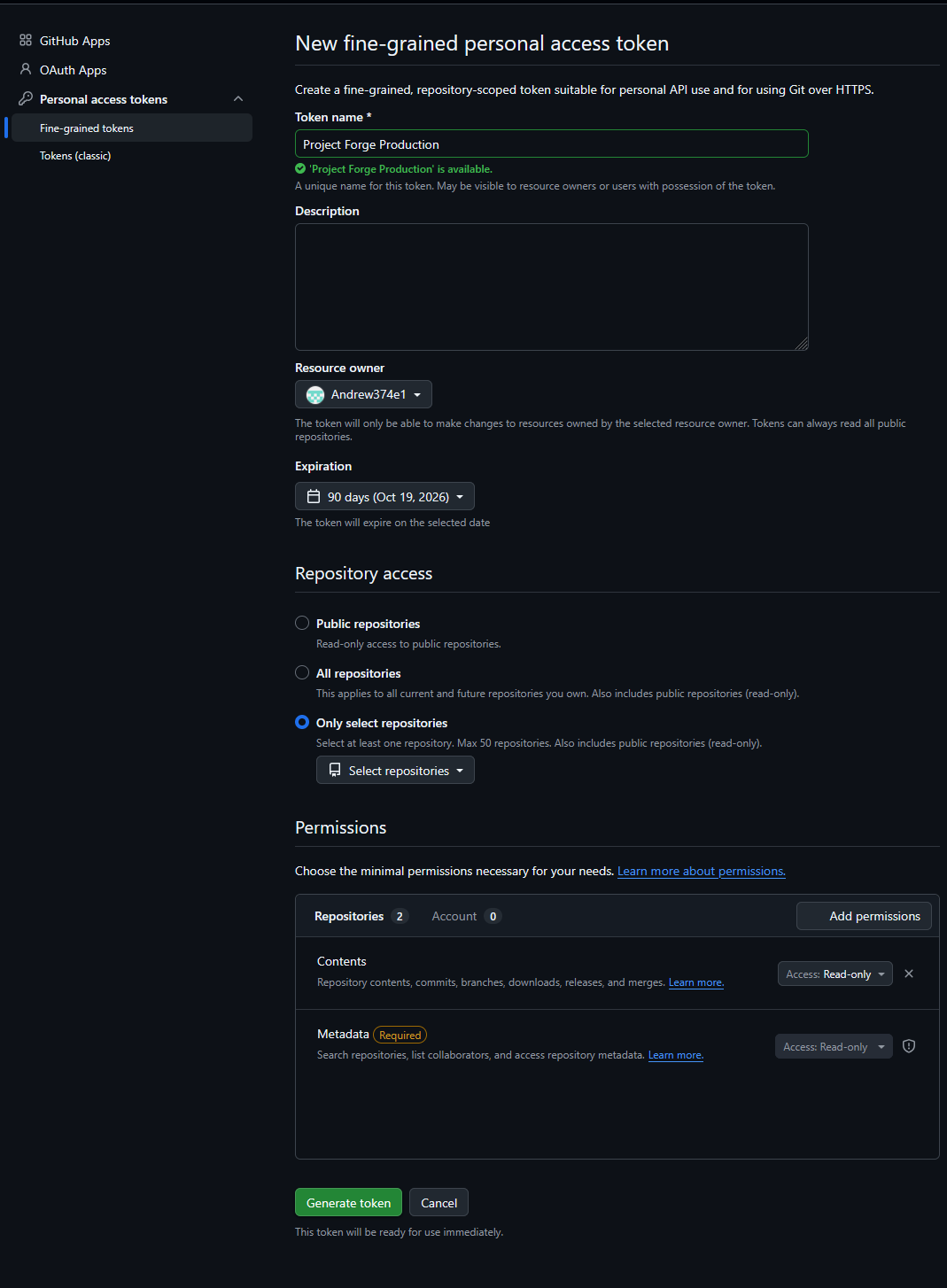
The example above shows the production token limited to the Project Forge repository, with Contents and required Metadata permissions set to read-only. Click the image to open the full-size version.
- Sign in to the GitHub account that can read
Andrew374e1/ProjectForge-WMS. - Open the profile menu, then Settings.
- Open Developer settings.
- Open Personal access tokens, then Fine-grained tokens.
- Click Generate new token.
- Enter an environment-specific name such as
Project Forge WMS - Production Updater. - Set an expiration date that follows company credential-rotation policy.
- Set the resource owner to
Andrew374e1. - Limit repository access to
ProjectForge-WMSonly. - Under repository permissions, set Contents to Read-only. GitHub supplies required metadata read access automatically.
- Leave every unrelated permission at its default no-access value.
- Generate the token and copy it immediately. GitHub displays the complete token only once.
- Store it directly in the environment's private
config/system_update.phpfile.
Token security: never paste a real token into kbase, tickets, chat, terminal history, screenshots, application logs, or Git. Use separate staging and production tokens so either environment can be revoked independently.
Official reference: Managing personal access tokens on GitHub.
Validate the token without displaying it
read -rsp "GitHub token: " GITHUB_TOKEN
echo

curl --silent --show-error \
  --header "Accept: application/vnd.github+json" \
  --header "Authorization: Bearer $GITHUB_TOKEN" \
  --header "X-GitHub-Api-Version: 2022-11-28" \
  --write-out "HTTP_STATUS=%{http_code}\n" \
  https://api.github.com/repos/Andrew374e1/ProjectForge-WMS

unset GITHUB_TOKEN
A valid token returns repository metadata and HTTP_STATUS=200. A private repository commonly returns 404 when the token is invalid, expired, assigned to the wrong owner, or missing repository access.
2.6 Create the private channel configuration
Create the file outside httpdocs.
Environment | Exact path | Channel |
|---|---|---|
Staging |
|
|
Production |
|
|
The staging file returns this array:
return [
    'channel' => 'staging',
    'github_token' => 'STAGING_GITHUB_TOKEN',
];
The production file returns this array:
return [
    'channel' => 'production',
    'github_token' => 'PRODUCTION_GITHUB_TOKEN',
];- Use a fine-grained token limited to
Andrew374e1/ProjectForge-WMSwith Contents read access. - Never place the token under
httpdocsor commit it to Git. - Set file mode
0640and ownership that allows web PHP and the scheduled worker to read it. - A valid
PROJECT_FORGE_UPDATE_CHANNELenvironment value takes precedence over the private file. - The hostname, Git branch, Plesk repository, and manifest do not determine the channel.
Release filtering: staging accepts prereleases and stable releases. Production rejects drafts and prereleases and accepts stable releases only.
2.7 Create private updater storage
APP_ROOT=/var/www/vhosts/ENVIRONMENT_DOMAIN
DOCROOT="$APP_ROOT/httpdocs"
UPDATE_STORAGE="$APP_ROOT/storage/system_updates"
SITE_USER=$(stat -c '%U' "$DOCROOT")
SITE_GROUP=$(stat -c '%G' "$DOCROOT")

sudo install -d -o "$SITE_USER" -g "$SITE_GROUP" -m 0750 \
  "$APP_ROOT/storage" \
  "$UPDATE_STORAGE" \
  "$UPDATE_STORAGE/downloads" \
  "$UPDATE_STORAGE/extracted" \
  "$UPDATE_STORAGE/backups" \
  "$UPDATE_STORAGE/locks" \
  "$UPDATE_STORAGE/logs"
Replace ENVIRONMENT_DOMAIN with the exact staging or production domain. Storage must remain outside httpdocs.
2.8 Configure the scheduled worker
- In Plesk Scheduled Tasks, use task type Run a PHP script.
- Script path:
schedulescripts/system_update.php. - PHP version:
8.5. - Schedule: every minute.
- Run as the website subscription user.
Do not use Run a command. The Plesk chroot command environment may not contain the required PHP executable.
2.9 Verify the installation
- Confirm the System Update page displays the correct environment channel.
- Confirm PHP runs as an FPM application served by nginx and
short_open_tagis on. - Confirm the application database configuration points to the correct environment database.
- Confirm the private configuration and updater storage resolve outside
httpdocs. - Confirm the website user can write to updater storage.
- Confirm PHP provides
curl,mysqli, andzip. - Run the scheduled task once and confirm it exits normally when no job is queued.
- Keep Plesk Git deployment mode set to manual.
3. One-Time Server Requirements
Requirement | Staging | Production |
|---|---|---|
Channel |
|
|
GitHub token | Fine-grained private-repository token with Contents read access. | |
PHP | PHP 8.3+; tested with Plesk PHP 8.5; FPM application served by nginx;
;
,
, and
. | |
Database config | Directory:
. Filename:
. It must be environment-specific, protected, and excluded from releases. | |
Private config |
, outside
, mode
. | |
Private storage |
, outside
, writable by website user. | |
Plesk Git | Manual deployment mode. | |
Worker | Plesk Run a PHP script ;
; PHP 8.5; every minute. | |
4. Manifest and Version Requirements
- Use semantic versions, for example
1.0.6. - Increase the numeric
buildfor every release. - The tag must be
vplus the exact manifest version. - Set release date and administrator-readable release notes.
- Change
database_versiononly when adding migrations. - Never edit a published release manifest or move an installed tag.
{
  "application": "Project Forge WMS",
  "version": "1.0.6",
  "build": 6,
  "release_date": "2026-07-21",
  "minimum_php": "8.3",
  "minimum_mariadb": "11.8",
  "database_version": "20260717_001",
  "release_notes": [
    "Describe the administrator-visible change.",
    "Describe important operational or security behavior."
  ]
}
5. Local Developer Commands
5.1 Start with a clean branch
cd C:\Development\wms
git status --short
git branch --show-current
git pull --ff-only
Use main. Resolve unrelated changes before release preparation.
5.2 Review edits
git status --short
git diff
git diff -- path\to\specific-file.php
5.3 Validate
C:\xampp\php\php.exe -l path\to\changed-file.php
C:\xampp\php\php.exe httpdocs\modules\system_update\tests\system_update_tests.php
Syntax-check every changed PHP file and require all relevant tests to pass.
5.4 Add, review, commit, and push development changes
git add path\to\changed-file.php path\to\another-file.js
git status --short
git diff --cached
git commit -m "Describe the implemented change"
git push origin main
Use explicit paths. Review staged changes before committing and preserve unrelated work.
6. Prepare and Publish the Release
6.1 Commit the manifest
git diff -- httpdocs/manifest.json
git add httpdocs/manifest.json
git diff --cached
git commit -m "Release v1.0.6"
git push origin main
6.2 Verify before tagging
git status --short
git log -2 --oneline
The worktree must be clean and the release commit must already appear on origin/main.
6.3 Tag the release commit
git tag -a v1.0.6 -m "Project Forge WMS v1.0.6"
git push origin v1.0.6
git show v1.0.6 --no-patch --format=fuller
6.4 Verify GitHub Actions and assets
The release workflow must succeed and create a prerelease with exactly:
project-forge-wms-v1.0.6.zip
project-forge-wms-v1.0.6.sha256
If the workflow fails, fix the workflow or code; do not manually create an incomplete Release.
7. Correcting an Unpublished Bad Tag
Replace a tag only when no valid Release/assets exist and no server consumed it.
git ls-remote --tags origin refs/tags/v1.0.6
git push origin --delete v1.0.6
git tag -d v1.0.6

# Correct and commit first, then recreate:
git tag -a v1.0.6 -m "Project Forge WMS v1.0.6"
git push origin v1.0.6
Published or installed tag: never move it. Publish a new version and build.
8. Staging Installation and Testing
- Confirm Plesk Git mode is manual; do not deploy the repository.
- Open staging System Update and click Check for Updates.
- Verify local/remote version and build, channel
staging, tag, requirements, and migrations. - For migrations, create and verify an external database backup.
- Click Update exactly once.
- The Plesk PHP scheduled task claims the queued job.
- Wait for status
doneand phasecomplete.
downloadverifyextractpreflightbackupinstallmigratepost-updatecleanupcomplete
APP_ROOT=/var/www/vhosts/staging.wms.thethreelogistics.com

grep -E '"version"|"build"' "$APP_ROOT/httpdocs/manifest.json"
ls -lt "$APP_ROOT/storage/system_updates/logs"
sed -n '1,300p' "$APP_ROOT/storage/system_updates/logs/JOB_ID.log"
ls -l "$APP_ROOT/config/system_update.php"
Required staging tests
- Installed manifest exactly matches the candidate version/build.
- A new update check no longer offers the installed release.
- Login, permissions, navigation, layouts, and target modules render.
- Critical WMS workflows and background jobs succeed.
- Uploads, attachments, private config, and protected paths are unchanged.
- Job log confirms checksum verification and completion.
9. Record Staging Approval
Tag and commit | Exact tag and full commit SHA |
|---|---|
Artifact | ZIP filename and SHA-256 |
Job | Staging job ID and completion time |
Database backup | Backup ID/time when migrations exist |
Testing | Tester, results, issues, and approval time |
10. Promote Without Rebuilding
- Open the existing tested GitHub Release.
- Edit it and clear Set as a pre-release.
- Save without changing the tag or assets.
Immutability gate: tag, commit, ZIP bytes, filename, and SHA-256 must remain identical to staging.
11. Production Deployment
11.1 Readiness
- Production channel is
production. - Updater foundation and private storage are already installed and tested.
- Plesk task is Run a PHP script, PHP 8.5, every minute.
- Plesk Git automatic deployment is disabled.
- Application and database backups are current and recoverable.
- Monitoring, maintenance window, and responsible operators are ready.
11.2 Install and verify
- Click Check for Updates.
- Confirm channel, stable tag, version, build, requirements, and checksum identity.
- Confirm backups and click Update once.
- Monitor until
done/complete. - Verify manifest, log, protected paths, health, and business workflows.
APP_ROOT=/var/www/vhosts/production.example.com

grep -E '"version"|"build"' "$APP_ROOT/httpdocs/manifest.json"
ls -lt "$APP_ROOT/storage/system_updates/logs"
sed -n '1,300p' "$APP_ROOT/storage/system_updates/logs/JOB_ID.log"
12. Failure Rules
- Do not repeatedly click Update; inspect the existing job and its log.
- Do not move the tag or replace assets after consumption.
- Correct a failed candidate by publishing a new version/build.
- Before migration, verify automatic file rollback results.
- During/after migration, stop and use the external database recovery plan.
- Preserve logs, inventory, checksum, tag, and commit as incident evidence.
13. Final Checklist
- Changes reviewed; syntax and tests pass.
- Manifest version/build/date/notes are correct.
- Release commit is on
origin/main. - Tag points to that release commit.
- GitHub prerelease and both custom assets exist.
- Staging installs and validates the exact artifact.
- Release is promoted by metadata only.
- Production readiness and backup gates pass.
- Production installs and validates the same immutable artifact.
API endpoints
Implementing a New WMS API Endpoint
This guide explains the standard process for adding an endpoint to the existing WMS API. It is written for a developer who is new to this codebase.
Purpose
The WMS API uses one central entry point. API requests are sent to the API index file. That file determines the request path and method, then sends the request to the correct endpoint handler. Shared response, authentication, permission, URL, and request-reading helpers are kept in the API bootstrap file.
Project Forge is in Implementation Mode. Preserve the current API structure, authentication, response format, and route style unless the request specifically requires an architectural change.
Files Used for an Endpoint
File | Purpose |
|---|---|
httpdocs/api/index.php | Contains endpoint handlers, the route list, and request dispatching. |
httpdocs/api/bootstrap.php | Contains common JSON response, authentication, permission, URL, and request helpers. |
API rewrite configuration file | Forwards API requests to the central API index file. It normally does not change when adding a route. |
Plan the Endpoint First
Before editing code, define the endpoint in operational terms.
- What WMS record or warehouse action does it support?
- Who may use it?
- Is it read-only, or does it change WMS data?
- What information is required from the caller?
- What result should be returned?
- How will access be limited to the correct client?
Use business-oriented route names that match existing routes. Orders, shipments, and inventory are examples. Review the existing API routes before selecting a new name.
Required Security Rules
Use the Existing Authentication Flow
The current WMS API uses the authenticated WMS session. It supports the WMS and the client portal. It is not currently designed as an external integration API with separate API keys or OAuth access.
Do not bypass the existing authentication or permission flow when adding an endpoint.
Protect Client Data
A client user may only view or change records that belong to that client. This rule applies to every endpoint that reads or changes client data.
Use the authenticated user context to determine the permitted client. Do not trust a client identifier supplied in the request by itself. Enforce ownership in the record lookup or database query.
Validate Input
Validate required path values, query values, and request fields before reading or changing data. Reject missing, malformed, or unsupported values through the existing API error response helper.
Use the Standard Response Format
Every endpoint must use the existing API success and error response helpers. Do not create custom JSON formats for a single endpoint and do not print JSON directly from the handler.
Implementation Procedure
1. Find a Similar Endpoint
Open the API index file and locate the closest existing endpoint. Follow its approach for permissions, client scoping, response fields, error handling, and route dispatching.
2. Add a Handler
Add the business-logic handler in the handler section of the API index file. Use a clear name that identifies the resource and action.
A handler should follow this order:
- Read and validate the required input.
- Confirm the authenticated user has permission for the action.
- Determine the permitted client from the authenticated user.
- Load the requested record with client ownership enforced when applicable.
- Return a standard error if the record is missing or unavailable.
- Perform the allowed read or write action.
- Return the result through the standard success helper.
3. Register the Route
Add the route to the API route list in the API index file. This keeps the available routes discoverable and consistent with the current dispatcher.
4. Connect the Dispatcher
In the API route-dispatch section, add the path and request-method match that calls the new handler.
- Use a read request branch for a read-only endpoint.
- Use a create or action request branch for an endpoint that changes data.
- Keep related routes inside the existing parent resource section, such as orders or shipments.
- Use the existing method-not-allowed response when a route does not support the requested method.
5. Confirm Routing
A normal route addition should not require a change to the API rewrite file. If the new API URL returns a server-level not-found page instead of an API JSON response, verify that the rewrite rule still forwards the request to the API index file.
Route Examples
Purpose | Route Shape | Request Method |
|---|---|---|
List records | Orders collection | GET |
Read one record | Orders collection followed by an order identifier | GET |
Perform a controlled action | Order record followed by an action name | POST |
These are route-shape examples only. Match the actual route conventions already used in the API index file.
Testing Before Release
- Run the PHP syntax check on each PHP file that changed.
- Test the normal successful request while logged in as an authorized WMS user.
- Test a request with missing required information.
- Test an invalid or non-existent record identifier.
- Test an unsupported request method.
- Test with a client-scoped user and confirm that another client record cannot be viewed or changed.
- For a write endpoint, confirm the WMS record changes once and the response accurately reflects the completed action.
Because the API uses the logged-in WMS session, use a logged-in browser session or an approved session-aware test process. Do not place credentials, session values, tokens, or client data in source code, screenshots, documentation, or Git commits.
Endpoint Completion Checklist
- The endpoint purpose, route, method, permission, and response fields are defined.
- A handler was added using the existing WMS pattern.
- Input validation uses the standard API error response.
- Client ownership is enforced for client data.
- The route is listed and connected in the API index file.
- Success and error responses use the existing API helpers.
- PHP syntax checks pass.
- Success, validation, not-found, permission, and client-isolation tests pass.
- The endpoint is documented before release.
Documentation Required for Every Endpoint
When a new endpoint is added, document the following in the WMS developer documentation:
- Endpoint name and purpose
- Request method and route
- Required authentication and permissions
- Client-scoping behavior
- Required path, query, and request values
- Success response fields
- Expected error responses
- Test procedure
Keeping this information current allows the next developer to extend the WMS safely without changing its established architecture.